Skip nav to main content.

Account Information

  • Your account numbers are a combination of your Membership number and the account-type number. A suffix is added to the end of your Membership number to indicate if it is your savings account or your checking account.

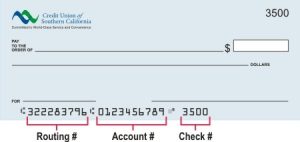
  • One way to find your account number is to look at the series of numbers on the bottom of your check.

    Still having trouble finding your account number? Give us a call at 866.287.6225.

  • The routing number for CU SoCal is 322283796. This number may be used for a variety of services, including direct deposit, wire transfers, tax purposes, and paying utilities.

    Here are some other important details that may help you when you’re asked to provide our routing number.

    • Name: Credit Union of Southern California
    • Address: 8101 E Kaiser Blvd, Ste 300. Anaheim, CA 92808-2261
    • Phone Number: 866.287.6225
    • Account Name: (ex. Checking Account)
  • Your MICR number is the combination of the routing number, account number, and check number listed at the bottom of your check.

  • You can set up direct deposit using the  “Set Up Direct Deposit” widget in Online or Mobile Banking under the “Accounts” heading to access information needed for direct deposit.

    Alternatively, you can complete our Direct Deposit form and submit it to your employer’s payroll department.

  • You can re-pin your debit card through Online and Mobile Banking. Alternatively, you may call our support team at 866.CU.SoCal (866.287.6225). For security purposes, we do not have access to see any Members’ PINs.

  • Yes, when possible, we appreciate advanced notice of at least 48-hours to ensure there will be no disruption when accessing your funds while out of town.

  • We’re sad to see you go. You may close your account in-person at a CU SoCal branch, or you may request to close your account by completing the  Request To Close Account form and mailing it to P.O Box 76000 Anaheim, CA 92809 or faxing it to us at 714.990.5492. A copy of your ID will be requested at the time of account closure.

  • You can update your address in Online Banking or you can complete our Change of Address form and drop it off at your nearest CU SoCal branch, mail it to P.O Box 76000 Anaheim, CA 92809, or fax it to us at 714.990.5492.

  • Absolutely! Simply complete our  Password Request form  and drop it off at your nearest CU SoCal branch, mail it to P.O Box 76000 Anaheim, CA 92809, or fax it to us at 714.990.5492.

  • You can remove a joint owner from your account by completing our Consent To Remove A Joint Owner form and dropping it off at your nearest CU SoCal branch, mailing it to P.O Box 76000 Anaheim, CA 92809, or faxing it to us at 714.990.5492.

  • You can add or change your account beneficiary by completing our Designation of Beneficiary form and dropping it off at your nearest CU SoCal branch, mailing it to P.O Box 76000 Anaheim, CA 92809, or faxing it to us at 714.990.5492.

  • To sign up for CU SoCal Courtesy Pay, please complete our Courtesy Pay Authorization form and drop it off at your nearest CU SoCal branch, mail it to P.O Box 76000 Anaheim, CA 928090, or fax it to us at 714.990.5492.

  • Fill out our electronic form to make any updates to your direct deposit or automatic payments. Visit our Cedars-Sinai page.

  • The Social Security Administration (SSA) sets official payment dates, but deposits at CU SoCal often post a little earlier. We post SSA and SSI deposits the same day they arrive.

    SSA Payments (based on your birthday):

    • Birthdays 1st–10th → Payment scheduled for the second Wednesday of each month.
    • Birthdays 11th–20th → Payment scheduled for the third Wednesday of each month.
    • Birthdays 21st–31st → Payment scheduled for the fourth Wednesday of each month.
    • Deposits often arrive the Friday before the scheduled date (unless affected by a holiday).

    SSI Payments:

    • Scheduled for the 1st of each month.
    • Deposits may arrive up to 4 days early if the 1st falls on a weekend or holiday.
    • Example: The September SSI deposit will post Monday, August 25.
  • You can set up a free Automatic Deposit Alert in Online or Mobile Banking to know the moment your deposit posts.

    How to set up your alert:

    1. Log in to Online or Mobile Banking
    2. Go to Tools > Alerts > Automatic Deposit
    3. Choose to receive alerts by email, text message, push notification—or all three

    This way, you’ll always know when your Social Security or SSI funds are available without having to check manually.
Opening an account

  • You’re within CU SoCal’s field of Membership if you meet any one of the following qualifications: 

    • If you are a relative or household member of a current CU SoCal Member. 
    • If you live or work in Lake Havasu City, AZ. 
    • If you are an employee of one of our partner companies. 
    • If you are a student at Rio Hondo College, Whittier Union High Schools District, El Rancho Unified School District, or Lowell Joint School District. 
    • If none of the above applies to you, CU SoCal will provide a complimentary Membership to one of our approved nonprofit partner associations. This membership to a partner association automatically qualifies you for full CU SoCal Membership benefits. Once a CU SoCal Member, always a CU SoCal Member—you do not need to keep your association membership to remain a CU SoCal Member. CU SoCal will take care of this process for you during your Membership application.  

    No matter how you qualify, once your Membership is established and your share (savings) account is opened, you’ll enjoy full access to CU SoCal’s products, services, and Member benefits. 

  • Yes. To open an account, we’ll need a copy of a valid, government-issued ID. If your current address does not match the address listed on your ID, we will also need a copy of your most recent utility bill with your name and current address.

  • We do! Here you go: Printable Membership Application.

  • We do! You may assign an adult as the custodian of the account while allowing the minor to be the primary account holder. To open a minor account, simply complete our Application to open a Minor Account—(UTMA) and visit a CU SoCal branch.

Fraud

  • If you suspect you’ve been a victim of identity theft or other fraudulent activity, please contact CU SoCal as soon as possible, toll-free at 866 CU SoCal (866.287.6225), so that we may take steps to protect the integrity of your account information and funds.

    In addition, please follow the steps outlined below:

    1. Contact the fraud department at any one of the three major credit bureaus to place a fraud alert on your credit file.

    • Equifax: 800.525.6285 or Equifax.com
    • Experian: 800/EXPERIAN (397.3742) or Experian.com
    • TransUnion: 800.680.7289 or TransUnion.com

    2. Close the accounts that you know or believe have been compromised or opened fraudulently.

    3. File a police report. Obtain a copy of the police report to submit to your creditors and others that may require proof of the crime.

    4. File your complaint with the FTC. The FTC maintains a database of identity theft cases used by law enforcement agencies for investigations. Filing a complaint also helps the government to learn more about identity theft and the problems victims are having so that they can better assist you. Visit the FTC website for more information.

    Additional Fraud/Loss Prevention Contacts

    Lost/Stolen Debit Card: 888.698.7241
    Lost/Stolen Credit Card: 800.556.5678

  • You can report an unauthorized debit out of your account by completing our Unauthorized Debit form and dropping it off at your nearest CU SoCal branch, mailing it to P.O Box 76000 Anaheim, CA 92809, or faxing it to us at 714.990.5492.

  • To report an unauthorized purchase made with your debit card, please complete our ATM/Debit Card Fraud form and drop it off at your nearest CU SoCal branch, mail it to P.O Box 76000 Anaheim, CA 92809, or fax it to us at 714.990.5492. In addition, if you debit card has been lost or stolen, please call: 888.698.7241.

  • To report a lost or stolen card, please call the corresponding number below:

    • Lost/Stolen CU SoCal Debit Card: 888.698.7241
    • Lost/Stolen CU SoCal Credit Card: 800.556.5678

Transactions

  • To place a stop payment on a check or a range of checks, you may log into the CU SoCal Mobile Banking app or your CU SoCal Online Banking account. If your accounts are not set up with online services, you may complete our Check Stop Payment form and drop it off at your nearest CU SoCal branch, mail it to P.O Box 76000 Anaheim, CA 92809, or fax it to us at 714.990.5492.

    To stop recurring and one-time automatic payments and withdrawals (ACH), simply complete our Stop Payment Request form and drop it off at your nearest CU SoCal branch, mail it to P.O Box 76000 Anaheim, CA 92809, or fax it to us at 714.990.5492.

  • To report an ATM transaction error please complete our Electronic Dispute/Error Notification form and drop it off at your nearest CU SoCal branch, mail it to P.O Box 76000 Anaheim, CA 92809, or fax it to us at 714.990.5492.

Loans & Credit Cards

  • Yes, CU SoCal allows Members to make payments from other financial institutions for CU SoCal Auto Loans, Personal Loans, and Credit Cards.

    To make a loan payment, follow onscreen instructions, or call our Member Service center at 866.287.6225 to pay by check over the phone.

  • CU SoCal has partnered with Southwest Business Corporation (SWBC) to track and verify all CU SoCal auto loan insurance coverage. You may submit your proof of insurance by visiting imcovered.com/cusocal and following the on-screen instructions.

  • The EMV chip is an embedded microchip in your Visa® card that provides the best security and protection against fraud. The chip is able to encrypt information, making it difficult for card information to be copied or counterfeited.

  • CU SoCal allows Members to skip a payment for any non-Real Estate CU SoCal loan for a $25 fee as long as the following requirements are met:

    • At least 18 payments have been made on the loan.
    • A payment on the selected loan is not presently more than 10 days past due.
    • A payment on the selected loan has never been more than 30 days past due.
    • The selected loan has not had more than three occurrences of payments which were 11-30 days past due.
    • A payment on the selected loan has not been skipped within the past year.
    • The loan payment being skipped is $75.00 or greater.

    Other requirements may apply.

    To skip a loan payment, simply complete our Skip A Loan Payment form and drop it off at your nearest CU SoCal branch, mail it to P.O Box 76000 Anaheim, CA 92809, or fax it to us at 714.990.5492.

  • Former FedONE Federal Credit Union (FedONE) Members may access their FedONE Visa® Credit Card information through ezcardinfo.com. You may also call the credit card customer service center at 800.808.7230 to view your balance and payment history.

  • Former South Western Federal Credit Union (SWFCU) Members may take an advance on their existing student loan at cusocal.studentchoice.org.

  • You can apply by submitting an application online, calling us at 866.287.6225. or visiting your nearest CU SoCal branch.

Auto Loans

  • Putting more money down on your purchase reduces how much you owe and decreases the risk associated with your loan. As a result, making a sizeable down payment on the purchase could result in a lower interest rate.

  • Most car buyers will experience a temporary reduction in their credit score after taking out an auto loan. Buying a new or used car with a loan can raise your credit score over the life of the loan, as long as you make on-time monthly loan payments.

  • Shopping for auto loan rates within a 14-day period will ensure that multiple inquiries are counted as only one inquiry or excluded entirely by some scoring systems, according to the credit bureau Experian. However, this can still cause a small reduction in credit score. Accepting a loan offer may cause another small score dip. A credit score will rise as on-time monthly loan payments are made.

  • Paying off your car loan early may hurt your credit score, but the effects are usually only temporary. Some lenders charge a loan prepayment penalty, so ask your lender if there are prepayment fees, before you pay off your car loan early. CU SoCal does not charge a prepayment penalty on any loan.

  • There are cost differences associated with leasing vs. buying a car, and these will be influenced by the term of a loan or a lease, how much money you put down, the interest rate you qualify for, and the value of the car. Buying a car gives you the freedom to drive unlimited miles and eventually own the car. Leasing is a great option for people who prefer to drive a new car every few years and don’t mind a mileage limitation.
  • Paying off a car loan early can save you money in interest you’d otherwise be paying. The sooner you pay off your car loan, the more money you’ll have each month. Not skipping any payments and making one large extra payment every year can help you pay off your loan earlyBefore you pay off your loan, ask your lender if they charge a pre-payment penalty.

  • Buying a new car feels great and you’ll have the peace of mind of driving a reliable vehicle. The benefits of buying a new car include the latest safety and fuel efficiency technologies. However, all these technological goodies come at cost. That’s why many individuals purchase certified pre-owned cars instead, as they can be less expensive.

  • Refinancing a car loan can save your money if you can get a lower interest rate. The first step of auto refinancing is to talk to different lenders about rates and loan terms. CU SoCal saves Members money every day through vehicle loan refinancing, and will drop your rate from another lender by at least 2%. If approved for a loan refinance, the remaining amount you owe on your first loan will be paid off and you will start making payments on the new loan. A small drop in credit score is likely, but most scores increase as on-time monthly loan repayments are made.

  • With a thorough plan in place, saving up for a car isn’t as complicated as you might think. Some actions you can take include creating a budget and a savings and purchase timeline, deciding on the type and make of car, and calculating an approximate monthly payment are all good ways to start saving.

  • Refinancing a car loan provides several advantages, including a lower interest rate, a lower monthly payment, and more. However, be aware that some financial institutions will charge prepayment or other fees for refinancing your car loan. And, if your new loan has a longer term, you may end up paying more for your car than if you just stuck with the original lender. CU SoCal will lower your vehicle loan rate from another lender by at least 2%. Learn more.

Transfers

  • To set up recurring transfers, simply complete our Authorization for Automatic Transfer form and drop it off at your nearest CU SoCal branch, mail it to 8101 E Kaiser Blvd, Ste 300. Anaheim, CA 92808-2261, or fax it to us at 714.990.5492.

  • To set up one-time or recurring automatic transfers to another CU SoCal account, simply complete our Authorization for Cross-Account Transfer form and drop it off at your nearest CU SoCal branch, mail it to P.O Box 76000 Anaheim, CA 92809, or fax it to us at 714.990.5492.

  • To set up one-time or recurring automatic transfers to another financial institution (or an external account), first login to Online Banking and navigate to the Add External account page by clicking “Transfers,” “External Account Transfers,” then “Add External Account.” Complete the required information for the other financial institution, confirm the information, and click “Save.”  The new external account will appear in your list of External Accounts.

    During the next two business days, you should receive two small deposits into your other financial institution’s account. Once the deposits have been made, please return back to this page. Click “Verify” next to the external account and enter the two deposited amounts and click “Save.” Once the correct amounts are entered, the account is verified and you will be able to start transferring money between your CU SoCal account and your external account.

Investments

  • You may login to view your investment portfolio directly at www.myaccountviewonline.com.

Online Banking

  • Visit our Digital Banking page to find out how to register for Online Banking.

  • Q1. Can I connect my Credit Union of Southern California (CU SoCal) accounts to Quicken?
    A. Yes. Credit Union of Southern California (CU SoCal) accounts can be connected to Quicken so you can download transactions and track your finances in one place. When setting up the connection in Quicken, search for “Credit Union of Southern California” or “Southern California” and follow the prompts to sign in using your Quicken credentials for Digital Banking (Online and Mobile Banking).

    Q2. What connection method does Quicken use for CU SoCal accounts?
    A. CU SoCal accounts connect to Quicken using a secure aggregation method to retrieve your account balances and transactions from Credit Union of Southern California so they can be automatically imported into your financial software.

    Q3. Why are my recent transactions not appearing in Quicken right away?
    A. Transaction updates between CU SoCal’s Digital Banking platform and Quicken are not always real-time. Transactions typically appear after they have fully posted to your account. If you don’t see a recent transaction yet, try running an account update in Quicken later in the day.

    Q4. What should I do if Quicken stops updating my CU SoCal accounts?
    A. If your accounts stop syncing in Quicken, try the following steps:

    • Update your accounts again in Quicken.
    • Confirm your Credit Union of Southern California Digital Banking username and password are correct.
    • If the issue continues, you may need to disconnect and reconnect your CU SoCal accounts in Quicken.
    Q5. Why does Quicken ask me to verify my identity when updating accounts?
    A. For security reasons, Credit Union of Southern California may occasionally require identity
    verification when Quicken connects to your accounts. You may be prompted to complete a one-time passcode verification or multi-factor authentication through CU SoCal’s Digital Banking platform. Once verified, your transactions should continue downloading normally.

    Q6. What should I do if my accounts duplicate or need to be relinked in Quicken?
    A. If your accounts appear duplicated or stop syncing, you may need to relink them in Quicken. During the setup process, be sure to link the downloaded account to your existing account in Quicken, rather than creating a new one. This helps prevent duplicate accounts and keeps your historical transaction data intact.

    Q7. Why did Quicken stop downloading my CU SoCal transactions?
    A. If Quicken stops downloading transactions, it is often due to a password change or a security reset in Digital Banking. If you recently updated your login credentials for Credit Union of Southern California, you may need to re-enter them in Quicken and run an account update.

    Q8. What should I do if I receive a connection error in Quicken?
    A. Connection errors can occur periodically when Quicken attempts to sync with CU SoCal’s Digital Banking platform. In many cases, the issue resolves itself within a few hours. Try updating your accounts again later. If the error continues, disconnecting and reconnecting your CU SoCal accounts in Quicken may resolve the issue.

    Q9. Why am I seeing duplicate transactions in Quicken?
    A. Duplicate transactions can occur if an account is added again instead of being linked to an existing account during setup in Quicken. If this happens, review your account settings and ensure the downloaded account is linked to your existing Credit Union of Southern California account in Quicken rather than creating a new one.

    Q10. How do I aggregate accounts from multiple financial institutions in Quicken?
    A. Link each account directly within Quicken by using “Add Account,” searching for your financial institution, and entering your credentials for each one individually. This process offers the most reliable syncing, fewer errors, cleaner transaction categorization, and full access to features like budgeting, reporting, and reconciliation.

    Q11. When should I contact support?
    A. If your accounts still will not sync after reconnecting them in Quicken, or if you continue receiving connection errors, contact Quicken Support or call CU SoCal’s Member Care Center at 866.287.6225. To learn what versions of Quicken are currently supported, click here.

Debit Card Fraud Alerts

  • Credit Union of Southern California (CU SoCal) continually monitors our Members’ debit cards for fraudulent activity. Our fraud text alert service provides Members another level of security. If our fraud monitoring service detects a suspicious transaction on your account, we will alert you by SMS/text message of the transaction. You will reply “Yes” to confirm the transaction is valid or “No” to block the transaction if it is not authorized by you. If you respond “Yes,” you may continue to use your card as usual. If you respond “No,” the transaction will be blocked and a fraud prevention specialist will call you between 8 a.m. and 9 p.m. to further review the suspicious activity.

  • If you have provided CU SoCal with your mobile phone number and have an active CU SoCal Debit Card, you are automatically enrolled effective November 5, 2019.

  • No. Our fraud text service is free. You may receive and reply to fraud text alerts without incurring any charges, including from your wireless carrier.

  • No. Wireless carrier text fees do not apply with this service.

  • CU SoCal’s fraud text alert is available with all carriers that provide text message (SMS) services.

  • Alerts will generally arrive within one minute from an activity detected; however, timing may vary.

  • Messaging frequency depends on account activity. Messages may be sent 24 hours a day, 7 days a week.

  • If we don’t receive a response after five minutes, a fraud specialist will attempt to call you to verify the unusual or suspicious transaction.

  • Text messaging is required for this service; however, if you do not have text messaging, you will receive fraud alerts by phone call.

  • The ability to receive alerts outside of the U.S. will depend on your cell phone carrier. Please notify us if you will be traveling to set up a travel strategy.

  • No. Commands can be sent as upper case, lower case, or a combination of both.

  • Unfortunately, no. Just one mobile phone number may be linked to a single card number.

  • To receive alerts to your new number, please call us toll-free at 866 CU SoCal (866.287.6225), Monday-Friday: 9 a.m.-6 p.m., and Saturday: 9 a.m.-1 p.m., to update your contact information.

  • Yes. If you receive a fraud alert by text, please first confirm if the transaction was authorized. Then, simply respond “Stop” to the text message. Please keep in mind that fraud text alerts are a great way to receive notification in real time when there is a suspicious transaction on your card. This allows you to take immediate action to help protect your account.

  • Not at this time; however, we will soon offer Members an email option.

  • Yes. CU SoCal will NEVER send you a message asking for your personal or account information. If you receive a message asking for this type of information, contact us immediately and do not respond to the message.

  • Below is a summary of items included on a valid fraud text message as well as what will not be included.


    Text will include:

    • Credit union name
    • Last four digits of your card number
    • The amount in question
    • The merchant’s name
    • Reply options: Yes, No, or Stop (to opt out)


    Text will NOT include:

    • Requests for information including card numbers, PINs, CV2 codes, expiration dates
    • Vague reference of “merchant”
    • Hyperlinks to unknown websites
    • Phone numbers as hyperlinks
    1. Be sure your contact information is current and your mobile phone number is listed as such—not your home phone.
    2. Immediately report a lost or stolen debit card by calling 888.698.7241.

Credit Card Fraud Alerts

  • Credit Union of Southern California (CUSoCal) continually monitors our Members’ credit cards for fraudulent activity. Our fraud text alert service provides Members another level of security. If our fraud monitoring service detects a suspicious transaction on your account, we will alert you by SMS/text message of the transaction. You will reply “Yes” to confirm if the transaction is fraudulent or “No” if the transaction is not fraudulent. If you respond “No” you may continue to use your card as usual. If you respond “Yes” an immediate block will be placed on your card and you will be directed to call our Fraud Detection Department.

  • If you have provided CU SoCal with your mobile number or email and have a CU SoCal Credit Card, you are automatically enrolled effective April 5, 2022.

  • No. Our fraud text service is free. You may receive and reply to fraud text alerts without incurring any charges, including from your wireless carrier.

  • No. Wireless carrier text fees do not apply to this service.

  • CU SoCal’s fraud text alert is available with all carriers that provide text message (SMS) services.

  • Alerts will generally arrive within one minute from an activity detected; however, timing may vary.

  • Messaging frequency depends on account activity. Messages may be sent 24 hours a day, 7 days a week.

  • When a SMS/text message is sent and a response is not received after 15 minutes, an email will be sent. If there is not an email address on file, a fraud specialist will attempt to call you to verify the unusual or suspicious activity.

  • Text messaging is required for this service, however, if you do not have text messaging, you will receive fraud alerts by phone call.

  • The ability to receive text alerts outside the U.S. will depend on your cell phone carrier. Please notify us if you will be traveling to set up a travel strategy.

  • No. Commands can be sent as upper case, lower case, or a combination of both.

  • Unfortunately, no. Just one mobile number maybe linked to a single card number.

  • To receive alerts on your new number, please call us toll-free at 866 CU SoCal (866.287.6225), Monday – Friday: 9 a.m. – 1 p.m., and Saturday: 9 a.m. – 1p.m., to update your contact information.

  • Yes. If you receive a fraud alert by text, please confirm if the transaction was authorized. Then, simply respond “Stop” to the text message. Please keep in mind that fraud text alerts are a great way to receive notification in real time when there is a suspicious transaction on your card. This allows you to take immediate action to help protect your account.

  • Yes. If there is not a mobile device listed on your account, an email message is sent instead.

  • Yes. CU SoCal will NEVER send you a message asking for your personal or account information. If you receive a message asking for this type of information, contact us immediately and do not respond to the message.

  • Below is a summary of items included on a valid fraud text message as well as what will not be included.
    Text will include:

    • Credit union name
    • Last four digits of your card number
    • Date of transaction in question
    • The amount in question
    • The merchant’s name
    • Reply options: Yes, No, or Stop (to opt out)

    Text will NOT include:

    • Requests for information including card numbers, PINs, CV2 codes, expiration dates
    • Vague reference of “merchant”
    • Hyperlinks to unknown websites
    • Phone numbers as hyperlinks
  • Be sure your contact information is current, and your mobile phone number is listed as such—not your home phone.

    Immediately report a lost or stolen credit card by calling 800.566.5678 24 hours a day, 7 days a week or 888.698.7241 Monday – Friday: 9 a.m. – 1 p.m., and Saturday: 9 a.m. – 1p.m.

Didn't find what you were looking for?