Wave of Savings
Get up to $200 cash bonus with Rewards Checking1, enjoy auto loan rates as low as 3.99% APR2, and earn 3.50% APY on a 10-month Flex Certificate.3

Welcome to CU SoCal. We're glad you're here!
-
To help you save time, we encourage you to take advantage of our self-service tools.
If you’ve logged into LA Financial’s Online or Mobile Banking at least once since January 1, 2024, your profile has automatically transferred to CU SoCal—no need to register again. Simply click the login button and use the same username and password you’ve been using. If you last accessed LA Financial’s Online or Mobile Banking prior to January 1, 2024, you’ll need to register as a new user. Please do not use the “Register for Online Banking” option unless this applies to you.
- Try the “Forgot Username” prompt if you are unsure of your current username.
- Try the “Forgot Password” prompt if you are unsure of your current password.
If you typically log in and are used to seeing all your accounts under one profile, you’ll need to create multiple logins for each account. CU SoCal presents your digital banking profile based on your account, not your social security number.
Need further problem resolution? Please call us at 866.287.6225.
-
For most Members, your Membership number remained the same. However, a small group will see a prefix added to their existing number.
To view your “Important Information Regarding Your Credit Union Accounts” letter that includes your Member number and Share I.D.s, log into Online or Mobile Banking.
- If you are using your desktop or laptop to access Online Banking, select the “Tools” menu, “View Documents” and then “Overview.”
- If you are using the Mobile Banking app, select “More” at the bottom right of the screen, Under the “Tools” menu choose “View Documents” and then “Notices.” You will need to enroll in eDocuments to view your eNotices.
Please update any ACH transfers or automatic payments with your Member/account number and CU SoCal’s routing and transit number (322283796). This will help ensure everything continues to run smoothly.
Need further problem resolution? Please call us at 866.287.6225.
-
Good news—most Members can continue to use their existing username and password when logging into CU SoCal’s Online and Mobile Banking, making the transition smooth and easy. For your convenience, account nicknames and recurring transfers will carry over automatically.
Please note: If you’ve logged into LA Financial’s Online or Mobile banking at least once since January 1, 2024, your profile has automatically transferred to CU SoCal—no need to register again. Simply click the login button and use the same username and password you’ve been using. If you haven’t logged in since before that date, you’ll need to register as a new user. Please do not use the “Register for Online Banking” option unless this applies to you.
- To login your first time, use your existing LA Financial username and password. You’ll be prompted to secure your account by creating a new password.
- Next, agree to the disclosures and verify your Member number, social security number, and birthdate.
- Afterwards you’ll be asked where you would like a verification code sent to complete a multi-factor authentication (Choose from SMS Text, Email, or Voice Call).
After you login, please visit the “Tools” menu to reestablish your custom alerts and notifications for your debit card and account. While viewing your account, take a moment to review that your transfers, nicknames, and preferences have carried over.
Some features in Online and Mobile Banking may look or function differently than what you’re used to. These updates reflect the new experience and are designed to support your banking needs moving forward.
Need your Member number?
Log into Online or Mobile Banking and select the “Accounts” menu. Select the “Account Details” tab or tap the “Show Details” button at the top right side of the app screen. Your full number is listed under “MICR Account Number.”Need further problem resolution? Please call us at 866.287.6225.
-
If you are not an existing LA Financial digital banking user, or have not used LA Financial’s Online or Mobile Banking since prior to January 1, 2024, please register as a new user at CU SoCal’s Online and Mobile Banking. Visit CUSoCal.org/Login or download the CU SoCal App for your Apple or Android device to get started.
Select Register for Online Banking and follow the prompts. Once are registered and have agreed to the disclosures, sign up for eStatements, and verify your contact information.
- If you are using your desktop or laptop to access Online Banking, select the “Tools” menu, “View Documents” and then “Overview.”
- If you are using your device to access the Mobile Banking app, select “More” at the bottom right of the screen, Under the “Tools” menu choose “View Documents.” In the top right-hand corner find “Settings” to subscribe to eStatements.
After enrolling, you will see the eStatement preference as subscribed. You can now select if you would like to see all accounts on your dashboard or if you wish to hide accounts from view.
-
Please activate your new CU SoCal Visa® Debit Card to access your accounts and funds. Your current LA Financial Debit Card has been deactivated and payments made with it will no longer go through after 7 a.m. June 1.
You can call to activate you debit card: 866.762.0558.
You can also activate your debit card and set up a pin through Online and Mobile Banking.
- If you are using a desktop or laptop computer, visit the “Accounts” menu, then “Card Controls”, and select the desired card.
- If you are using the Mobile Banking app on a mobile device, select “More” at the bottom right of the screen, choose the “Accounts” menu, select “Card Controls,” and swipe to activate your card.
Members received a new CU SoCal Debit Card if they have used their current debit card after August 21, 2024, or, if their current card was issued after February 1, 2025, and not yet activated.
To keep things running smoothly, update your card information with any businesses or online retailers that automatically bill your debit card.
If you did not receive a debit card and would like one for your CU SoCal account, please call us at 866.287.6225 or visit one of our branch locations.
-
Great news—most existing Bill Pay payees integrated into CU SoCal’s Bill Pay so you can pick up right where you left off.
- Electronic payments to individuals did not transfer to the new Bill Pay system. Starting June 1, you can use Zelle® for person-to-person payments or set up External Transfers to move money between your accounts at other financial institutions.
- Bill Pay history did not transfer over. Please view eStatements for transaction history. After logging into CU SoCal’s Online or Mobile Banking select “View Documents” in the Tools Menu. At the top right in Settings, you can Subscribe to eStatements. Your previous eStatements will be available on June 1, 2025.
Need further problem resolution? Please call us at 866.287.6225.
-
Although no transaction history transferred over, your previous statements are available in eStatements.
All LA Financial Members received a paper statement for the period ending May 31, 2025, including those who currently receive eStatements. Due to regulatory requirements, you will need to re-enroll to continue receiving eStatements through CU SoCal’s Online and Mobile Banking.
After logging into CU SoCal’s Online or Mobile Banking select “View Documents” in the Tools Menu. At the top right in Settings, you can Subscribe to eStatements.
CU SoCal charges a paper statement fee of $2; however, this fee will be waived through September 30, 2025, for all Members. The fee will continue to be waived for Members 17 years of age and younger or 64 years of age and better. Beginning October 1, 2025, the $2 fee may be applied to your account. Please review the Schedule of Fees to learn how the fee may be waived.
Need further problem resolution? Please call us at 866.287.6225.
-
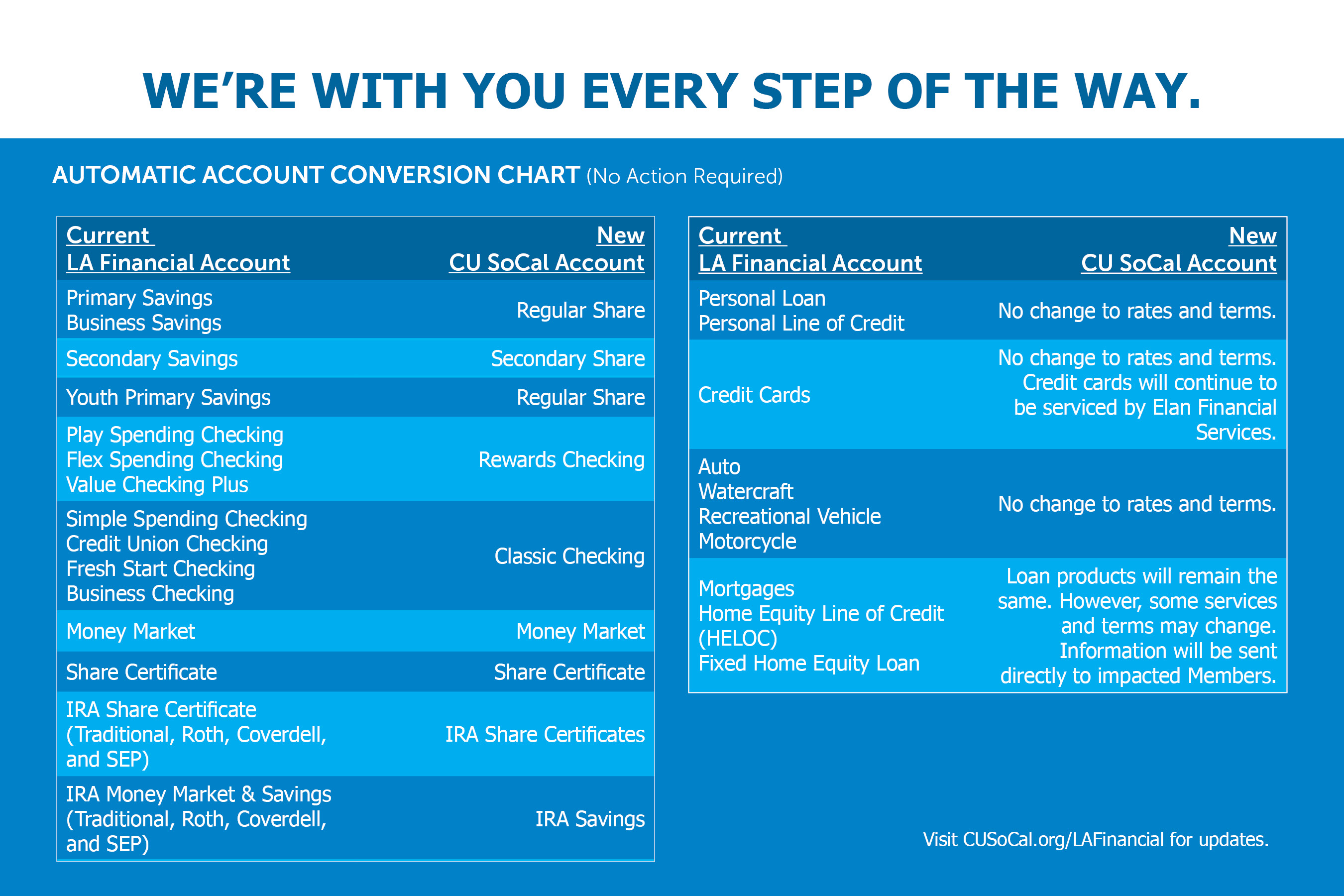
-
Good news—All LA Financial Credit Union branches are now part of CU SoCal!
You now have access to 21 additional CU SoCal branches and continue to have access to more than 5,600 Co-op Shared Branches and more than 30,000 surcharge-free Co-op ATMs.
Branch hours are Monday—Friday: 9 a.m. —5 p.m. and Saturday, 9 a.m. —1 p.m., unless otherwise noted. You’re always welcome to visit a branch at your convenience—or, to save time and plan ahead, you can easily schedule an appointment online.
Please visit our Branches and ATMs page for specific location information.
-
Rest assured—your internal transfers will continue without any interruption.
-
CU SoCal is proud to offer Zelle® for fast and easy person-to-person money transfers. Access Zelle® through the Transfer and Pay menu in our Mobile Banking App. For information and videos on how to use Zelle®, visit CUSoCal.org/Zelle.
-
Consumer Loans: There will be no changes to your existing loan terms.
Real Estate Loans: There will be no changes to your existing loan terms. Your real estate loan statement is available within Online and Mobile Banking. Your monthly recurring payments will continue as scheduled.
You are now able to make your home loan payments directly through CU SoCal’s Online and Mobile Banking. This change will make managing your first mortgage, home equity, and commercial loans faster and more convenient.
-
You should have received three temporary CU SoCal checks by July 15, 2025, and we encourage you to start using them once they arrive—but there’s no rush! Your current LA Financial checks will continue to clear as usual through June 1, 2026, giving you plenty of time to make the switch.
If you’d like a free box of CU SoCal branded checks, just give us a call at 866.287.6225 or stop by a branch before October 31, 2025. We are happy to order them for you.
If you currently have BaZing benefits along with your checking account, you will continue to receive those perks. Please login to the BaZing app as you normally would to access your BaZing account.
-
Your direct deposits and automatic payments—like payroll, Social Security, and gym memberships—will continue without interruption through June 1, 2026, so there’s no immediate need to make any changes. However, we do recommend updating your payment information as soon as it’s convenient to ensure a smooth transition.
For Social Security updates, you can call 1.800.772.1213 to schedule an appointment or visit ssa.gov. Be sure to have both your current LA Financial account and routing number (322077562), along with your new CU SoCal routing number (322283796).
LACERA ParticipantsTo update your LACERA Direct Deposit amount by June 1, 2026, visit the LACERA Direct Deposit website for complete details.-
To continue having your entire LACERA check directly deposited at CU SoCal without interruption, please use this form: LACERA Direct Deposit Form
-
If you only have a portion of your LACERA check deposited (payroll deduction), there is no need to update your information. If you would like to change the amount of your partial LACERA deduction being deposited at CU SoCal, please use this form: LACERA Partial Payroll Deduction Form
For all other employers and payroll, use the CU SoCal Direct Deposit Form and submit it to your HR or payroll administrator. -
-
If you have a LA Financial credit card, you’ll continue to use your existing card, which will remain serviced by Elan Financial Services—no need for a replacement.
Credit card payments can no longer be made in a CU SoCal branch or through our Member Care Center. Please be sure to make payments by calling Elan directly at 800.558.3424 or by visiting myaccountaccess.com. You can continue to log in using y
-
Overdraft transfers will continue as currently designated. Overdraft Privilege will be replaced with CU SoCal’s Courtesy Pay as an option to cover transactions when you may not have funds available. You may authorize CU SoCal to pay, rather than return, non-sufficient fund transactions on your everyday debit card transactions for a fee.
All existing opt ins will transition. See our Courtesy Pay brochure and Schedule of Fees for additional information. If you would like to opt in to Courtesy Pay after June 1, please fill out the Courtesy Pay Authorization form. Once complete, bring the form to any CU SoCal branch.
-
Your credit union Membership account terms and schedule of fees have changed. View an updated Schedule of Fees and About Your Accounts brochure for more information.
-
Your shares will continue to be protected by federal deposit insurance provided through the National Credit Union Share Insurance Fund (NCUSIF), a division of the National Credit Union Administration and backed by the full faith and credit of the United States Government.
-
If you have questions, please call CU SoCal at 866.287.6225. You’re also welcome to visit any CU SoCal branch location. For added convenience, schedule your branch visit at a time that works best for you to save time and avoid waiting.
Please visit our Branches and ATMs page for specific location information.
-
- Promotion valid beginning May 1, 2026, and is available for a limited time. CU SoCal reserves the right to discontinue or change this promotion at any time without notice. Referrer must be an active CU SoCal Member. Offer valid only for new Members, defined as individuals age 18 or older who have never been an owner on an account at CU SoCal. All new accounts are subject to verification through ChexSystems® and approval based on Membership eligibility. Referred new Members may earn a $50 cash bonus for opening a qualified checking account, and then become eligible for additional one-time cash bonuses upon successful completion of the following requirements: $50 for completing qualified debit card transaction usage, $50 for completing qualified direct deposit, and $50 for funding a qualified consumer loan, all within the prescribed timeframes specified below, for a maximum total bonus of $200. Referring Members may earn a $50 cash bonus when the referred new Member opens a qualified checking account, which is the maximum bonus available to the referrer per each referred new Member. A qualified checking account is defined as a Classic Checking or Rewards Checking account with a cumulative deposit balance of at least $25 within 14 days of the Membership open date. Qualified debit usage requires 12 qualified PIN based and/or Point of Sale (POS) debit card transactions (excluding ATM withdrawals; purchases that are directly convertible to cash such as casino gaming chips, money orders, wire transfers, or travelers checks; and debit card purchases for less than $1.50) per month for two consecutive calendar months within 90 calendar days of Membership open date. Qualified direct deposit requires at least $750 in cumulative direct deposits (e.g., payroll, pensions, or government benefits; transfers between accounts do not qualify) per month for two consecutive calendar months within 90 calendar days of Membership open date. A qualified consumer loan is defined as a vehicle or personal loan funded within 90 calendar days of Membership open date. The referred new Member must open a qualified checking account to be eligible for any additional bonuses, and once this requirement is met, additional bonuses may be earned independently and are not contingent upon one another, allowing the referred new Member to earn bonuses in any combination of qualifying activities up to a maximum $200 total. Debit card usage and direct deposit qualifications must be completed within 90 calendar days of Membership open date to be eligible for payout. The referring Member becomes eligible for their bonus once the referred new Member satisfies the qualified checking account opening requirement. Accounts must be open and in good standing to receive bonus payments. Cash bonuses will be deposited into the Member’s CU SoCal account within 60 calendar days after qualifying activities are completed and verified by CU SoCal. Offer cannot be combined with other promotional offers unless otherwise stated, and bonuses may be subject to IRS 1099 tax reporting.
Open Account
Leaving Our Website
If you click ‘Continue’ an external website that is owned and operated by a third-party will be opened in a new browser window. CU SoCal provides links to external web sites for the convenience of its members. These external web sites may not be affiliated with or endorsed by the credit union. Use of these sites are used at the user’s risk. These sites are not under the control of CU SoCal and CU SoCal makes no representation or warranty, express or implied, to the user concerning:
- the information, content, presentation, accuracy or opinions of these sites, or
- the quality, safety or suitability of any software found on these sites.
You are continuing to a credit union branded third-party website administered by our service provider. We are not responsible for the third-party’s data privacy practices, services, or overall content on the third-party site. Please review the service provider’s privacy policy for more information about its data privacy practices.
Using a hyperlink may identify you as a CU SoCal Member to the operator of the external site.
CU SoCal does not provide and is not responsible for the product, service or overall website content available at these sites. The privacy policies of CU SoCal do not apply to linked websites and you should consult the privacy disclosures on these sites for further information.
If you click ‘Cancel’ you will be returned to the CU SoCal website.